


How to Sign Up and Download WEEX: A Simple Guide for New Users Lian Trader Academy.
Finding a crypto exchange is easy. Setting it up correctly is usually the part that takes a little more attention.
If you have decided to try WEEX, you will probably want to know two things first: how to create an account and where to download the official WEEX app.
The good news is that the process is fairly simple. You can create a WEEX account with an email address or phone number and then use the same account on your smartphone or through a web browser.
In this guide, we will walk through the WEEX sign up process, explain how to download WEEX on Android and iPhone, and show you how to access WEEX from a Windows computer without installing suspicious third-party software.
How to Sign Up and Download WEEX: A Simple Guide for New Users
You do not need much to create a WEEX account.
Before starting, it is useful to have access to an active email address or mobile phone number because WEEX may send a verification code during registration.
You should also create a password that is different from the passwords you use for your email, social media or other trading accounts.
Most importantly, make sure you are using the official WEEX website or application. Crypto users are often targeted by fake login pages and cloned applications, so it is worth checking the website address before entering account information.
How to Sign Up for WEEX
The WEEX registration process can be completed in a few steps.
Start by opening the WEEX website and selecting Sign Up.
You will normally be asked to choose between registering with an email address or a phone number.
For many users, email registration is the simpler option because verification messages are easy to access and you are not dependent on receiving an SMS.
Create a WEEX Account With Email
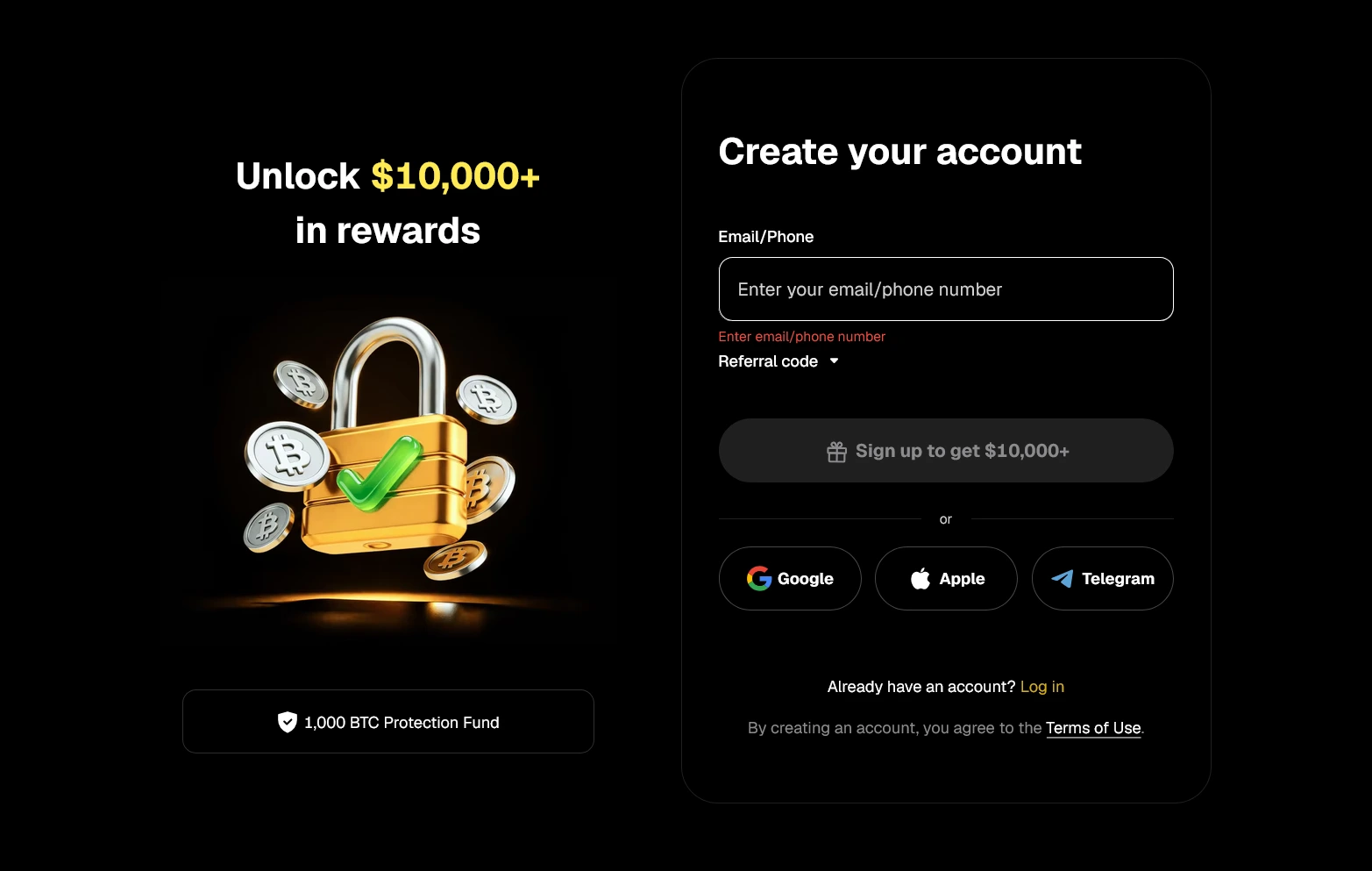
Sing Up Weex Exchange
Choose the email registration option and enter an email address that you use regularly.
Avoid disposable email services. Your email may later be important for account verification, login notifications or password recovery.
After entering your email address, continue to the verification step.
WEEX may send a short verification code to your inbox. Copy the code and enter it on the registration page.
If you cannot find the email immediately, check your spam or junk folder before requesting another code.
Create Your Password
The next important step is choosing your WEEX password.
Try not to reuse a password from another website.
A better approach is to use a longer password that combines letters, numbers and symbols. It should be difficult for someone else to guess but still manageable for you with a password manager.
Once the password has been accepted, review the information you entered before completing the registration.
Using a WEEX Referral Code
During WEEX sign up, you may see a field for an Invitation Code or Referral Code.
This section is normally used when another user, partner or affiliate has invited you to the platform.
If you already have a valid WEEX referral code, enter it before completing your registration.
Referral promotions can change from one campaign to another. That means users should not assume that every invitation code provides exactly the same reward or discount.
If a reward is important to you, check the current conditions associated with the referral code before creating the account.
If you do not have a referral code, you can simply continue with the standard WEEX registration process.
WEEX Login After Registration
Once your account has been created, logging in is straightforward.
Open WEEX and select Log In rather than Sign Up.
Enter the email address or phone number connected to your account, followed by your password.
Depending on your account security settings, WEEX may ask you to complete an additional verification step.
Once that is finished, you will be taken to your account dashboard.
You can use the same WEEX account on multiple supported devices, which means you do not need to create another account when switching from your phone to your computer.
How to Download WEEX
One of the most searched questions about the exchange is simply:
Where can I download the WEEX app?
The safest answer is to begin from the official WEEX download page rather than searching random APK websites.
WEEX currently provides mobile installation options for Android and iPhone users.
The installation method depends on the operating system and, in some cases, the region associated with your app store account.
WEEX Download for Android

Download weex for android
Android users generally have two ways to install the WEEX app:
Google Play
or
the official WEEX APK
Google Play is usually the easiest option.
Search for WEEX in Google Play, confirm that you are looking at the official application, and then tap Install.
Once installation is complete, open the app and log in with the account you created earlier.
Download WEEX APK
In some regions, an app may not appear in Google Play.
In that situation, Android users may prefer to install the official WEEX APK directly.
An APK is the installation file used by Android applications.
To reduce the risk of installing a fake or modified version, download the WEEX APK only from the official WEEX website.
After downloading the file, tap it to begin installation.
Your Android phone may display a warning about installing applications from outside Google Play. If that happens, review the source carefully and only continue if the APK came directly from the official WEEX download page.
After installation, open WEEX and sign in normally.
WEEX Download for iPhone

Download Weex For iPhone
iPhone users can also install WEEX, although availability may vary depending on the country or region associated with the Apple ID.
The first option to check is the Apple App Store.
Search for WEEX and verify the application before tapping Get.
After installation, open the app and either log in to your existing account or create a new one.
What If WEEX Is Not Available in the App Store?
Sometimes an application is not available through the App Store in every region.
WEEX may provide alternative installation methods for iOS users, including options such as TestFlight.
TestFlight is Apple’s official platform for distributing beta and limited-release applications.
If you decide to use this method, access the TestFlight invitation through the official WEEX website instead of using a link posted on an unknown website or social media channel.
Available iOS installation methods can change, so the official WEEX download page should always be your starting point.
Can You Download WEEX for Windows?

Download Weex For PC
Many users search for phrases such as:
WEEX download for Windows
WEEX PC app
or
WEEX desktop download
But you do not necessarily need a desktop application to use the exchange on a computer.
If an official Windows installer is not available on the WEEX download page, the safest solution is to use the web version.
Open Chrome, Edge, Firefox or another modern browser and visit the official WEEX website.
Select Log In, enter your account information and access the platform directly through your browser.
This approach is also useful because it avoids downloading unofficial EXE files from third-party websites.
If you see a website offering a mysterious “WEEX Windows installer,” do not assume it is official simply because the file includes the WEEX name.
Using WEEX on a Mac
Mac users can follow a similar approach.
Open the official WEEX website through Safari, Chrome or another supported browser and log in with your account.
A browser-based platform is often more convenient than installing unofficial desktop software because your account can be accessed without adding another program to the computer.
WEEX App or Web Version: Which One Should You Use?
There is no single correct answer.
The WEEX app is useful if you regularly check markets or manage your account from your phone.
A browser can be more comfortable when you are using a larger screen and want more space for charts, order forms and account information.
Many users simply use both.
For example, you can install WEEX on your Android or iPhone for mobile access and use the web version when you are working from a laptop.
Your login remains connected to the same account.
How to Avoid Fake WEEX Apps
Before downloading any crypto application, it is worth spending a few seconds checking the source.
Do not install a WEEX APK sent to you through a Telegram group or private message.
Avoid download websites that claim to provide “modified,” “premium” or “unlocked” versions of the application.
A cryptocurrency exchange app has access to extremely sensitive account information. A fake application can be designed to collect login credentials or redirect deposits.
The safest approach is simple: visit the official WEEX website first and use the download options provided there.
Problems Receiving the WEEX Verification Code
Occasionally, new users may not receive their verification code immediately.
If you registered with email, first check the spam and promotions folders.
Also confirm that you entered the correct email address.
If you are using a phone number, make sure the country code is correct.
Avoid repeatedly requesting new codes within a very short period because this can sometimes make the process more confusing if several different codes arrive.
Usually, using the most recent verification code is the best option.
Can You Use the Same WEEX Account on Android, iPhone and PC?
Yes, you generally do not need separate accounts for different devices.
For example, you may create your WEEX account through a laptop, download the WEEX app on Android later and log in using the same credentials.
The same applies if you change from Android to iPhone.
This makes it easier to use the mobile application when you are away from your computer and switch back to the web platform when you want a larger screen.
WEEX Registration Tips for New Users
Do not rush through the registration page.
Before confirming your account, make sure your email address or phone number is correct.
If you plan to use a referral code, check that it has been entered before finishing registration.
Use a unique password and avoid saving sensitive account information on shared computers.
After creating your account, consider reviewing the security options available inside your WEEX account before you begin using the platform regularly.
These simple steps take only a few minutes but can make account management much easier later.
Frequently Asked Questions About WEEX
How do I sign up for WEEX?
Open the official WEEX website or application, choose Sign Up and register using an email address or phone number. Complete the verification process and create your account password.
Can I register for WEEX with email?
Yes. Email registration is available and is one of the easiest ways to create a WEEX account.
Where can I download WEEX for Android?
Android users can normally install WEEX through Google Play or download the official WEEX APK from the exchange’s website.
Is there a WEEX app for iPhone?
Yes. WEEX can be used on iPhone. App Store availability can depend on region, and alternative official installation methods may also be provided.
Is the WEEX APK safe?
The important factor is where you get it. Download the APK directly from the official WEEX website rather than an unknown third-party APK website.
Can I use WEEX on Windows?
Yes. Windows users can access WEEX through a web browser even if they do not install a separate desktop application.
Do I need a new account for the WEEX mobile app?
No. If you already created a WEEX account on the website, you can normally use the same login information in the mobile app.
Where do I enter a WEEX referral code?
If a referral or invitation field appears during registration, enter your valid code there before completing account creation.
Final Thoughts
Getting started with WEEX does not require a complicated setup.
You can register with an email address or phone number, verify the account and then choose how you want to access the platform.
Android users can use Google Play or the official APK, while iPhone users can check the App Store and other official iOS installation options offered by WEEX. If you are using Windows or macOS, the web version gives you access without having to download unofficial desktop software.
The most important point is not which device you use. It is making sure that your registration page, download link and application all come from the official WEEX platform.
That small precaution can help you avoid one of the most common problems in crypto: fake websites and unofficial apps.